
.png)
Designing a Scalable Onboarding Strategy
Balancing product onboarding and premium conversion without overwhelming first-time users
Click on the flag for the German version!

My role
Benchmarking
Research
Facilitator
UX Concept
Prototyping
Research
Facilitator
UX Concept
Prototyping
The team
Product Owner
Premium Team
Editorial Team
UX Team Lead
UI Designer
UX Researcher
App Developers
Premium Team
Editorial Team
UX Team Lead
UI Designer
UX Researcher
App Developers
Deliverables
Stakeholder interviews
Brainstorming Workshop
App Onboarding
Plus Onboarding
Mid Fidelity Prototype
Brainstorming Workshop
App Onboarding
Plus Onboarding
Mid Fidelity Prototype
Context
The goal of this project was to improve first-time user engagement by introducing a structured onboarding experience to the WELT News app. At the same time, a parallel initiative required a dedicated onboarding flow for new WELTplus subscribers, focused on communicating premium value.
This led to two onboarding systems being developed in parallel, both targeting users at the beginning of their journey, but with different goals and triggers. To guide decision-making early on, we defined a set of principles the onboarding experience needed to satisfy.
This led to two onboarding systems being developed in parallel, both targeting users at the beginning of their journey, but with different goals and triggers. To guide decision-making early on, we defined a set of principles the onboarding experience needed to satisfy.
Providing an effective mobile application onboarding can significantly impact customer retention and churn rate reduction. According to a 2022 study, despite having an average of 40 apps installed, users spend around 89% of their screen time with a mere 18 applications. Securing a spot within these preferred 18 apps, as opposed to being overshadowed by competitors, depends highly on the user's very first encounter with your app.

Onboarding Design Principles
As a UX Designer, I worked closely with Product Owners, the Plus team, a UX Researcher, Editors, and developers in an iterative, cross-functional setup.
The Challenge of Balancing Two Onboarding Experiences
Designing onboarding screens was not the core challenge. The real challenge was aligning two competing onboarding flows within a single user journey.
- App onboarding introduced core features
- Plus onboarding promoted premium benefits
- Subscription timing was unpredictable
- Users could encounter both flows at different moments
Without coordination, this created a high risk of:
- overlapping triggers
- repeated interruptions
- fragmented first-time experiences
The complexity was not in the individual flows, but in how they interacted.
Collaborative Framing
To align the different perspectives across product, editorial, and engineering, I facilitated a collaborative workshop to explore how onboarding should function across the WELT ecosystem.
Rather than focusing on individual features, the discussion shifted toward the overall experience, specifically how onboarding could balance product understanding and premium communication within a single journey.
Rather than focusing on individual features, the discussion shifted toward the overall experience, specifically how onboarding could balance product understanding and premium communication within a single journey.

Combining insights from stakeholder input, prior research, and benchmarking, I defined a shared problem space:
“How might we introduce core features and premium value without overwhelming users during their first experience?“
Design Approach
Users don’t experience onboarding as separate systems, but as a single continuous flow. Early concepts combined both onboarding layers into one sequence, leading to dense and fragmented experiences.


This approach created multiple issues:
- overlapping onboarding triggers
- repeated interruptions
- too many consecutive information screens
- unclear separation between product and premium content
Instead of guiding users, the experience risked overwhelming them during first use. Through iteration and quick feedback, the focus shifted toward pacing, reducing density and distributing onboarding more deliberately across the journey.
Core Product Decision
To manage the complexity of multiple entry points and onboarding triggers, I mapped the onboarding logic across user states, content types, and interaction moments.
This blueprint defined when onboarding should appear, preventing consecutive information screens and separating product onboarding from premium messaging. This shifted the problem from “what to show” to “when to show it.”
This blueprint defined when onboarding should appear, preventing consecutive information screens and separating product onboarding from premium messaging. This shifted the problem from “what to show” to “when to show it.”

Onboarding Triggerpoints Blueprint
Based on this structure, the onboarding was redesigned as a sequenced experience:
- App onboarding establishes core understanding
- Plus onboarding is delayed and triggered contextually
- Onboarding elements are spaced across the journey


This ensured that users were not introduced to premium value before understanding the core experience, while reducing interruptions and improving overall clarity.
3. Exploring Onboarding Best Practices
Throughout the project, I observed a certain fluidity in the terminology when discussing onboardings and recognized instances of using specific terms interchangeably. This made me to undertake a comprehensive exploration of the realm of "first-screens”, that involved a thorough understanding of distinctions between launch screens, splash screens, and the rest. To bring everyone working on the project aligned, I gave a presentation that showcased an array of initial mobile app interactions designed to welcome, inform, or guide users effectively. By synchronising our terminology and by having a shared understanding, we could ensure a united approach moving forward.

Launch & Splash screens
When to use them?

Personalised set ups
When to use them?

Tooltips & Coach marks (Progressive Onboarding)
When to use them?

Login screens
When to use them?

Walkthrough (Function-oriented onboarding)
When to use them?

Walkthrough (Benefit-oriented onboarding)
When to use them?
6. Refining the User Flow to Prevent Overload
After the stakeholder check-in, I came up with a more unified concept, where the App onboarding screens were prioritised while the Plus onboarding, that became a walkthrough, is only shown to the user after they "completed" the App onboarding.


This userflow was more refined, but somehow it still felt overwhelming. Given the numerous possibilities of how readers interact with our app, with this concept implemented they would encounter a new piece of information on almost every screen, potentially ruining the first experience due to information overload. A quick guerrilla research reassured me in my assumption and I decided to adjust the flow in a way that users always encountered an intermittent screen between two onboarding tooltips, with no new piece of information. The blueprint below proved to be a helpful aid for me to oversee this extensive userflow.

Relying on this blueprint, I created the complete onboarding concept, showcasing both the feature-related onboarding and the plus subscription benefits in a well-timed manner.
Please note: The user flow below shows a case when a new reader interacts with the app the first time and signs up for WELTplus only after having spent a certain amount of time with browsing and reading articles.
Testing: User Feedback & Insights
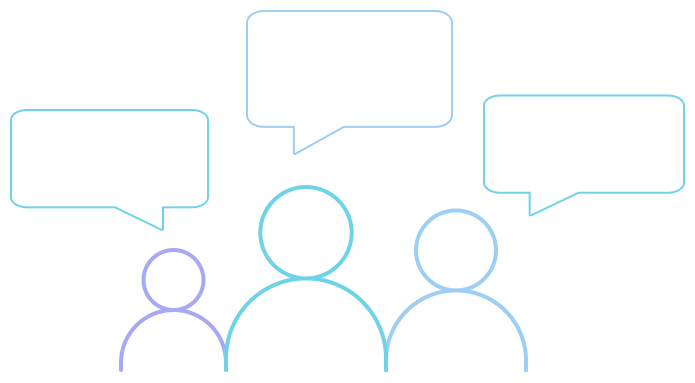
Once the concept was accepted by the stakeholders, the concept was tested using a clickable prototype with five users to identify friction points and comprehension gaps.
Key observations:
- Users understood the distinction between feature onboarding and premium messaging
- The sequencing reduced perceived interruption during first use
- No major confusion occurred across different entry scenarios
Minor feedback highlighted interest in personalization, which was considered for future iterations.
Results & Outcome
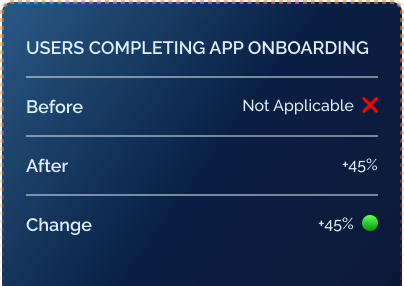
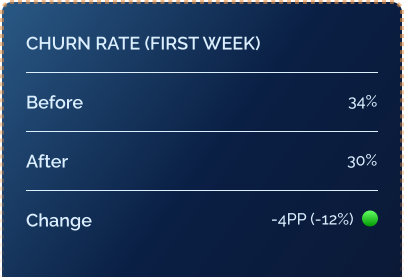
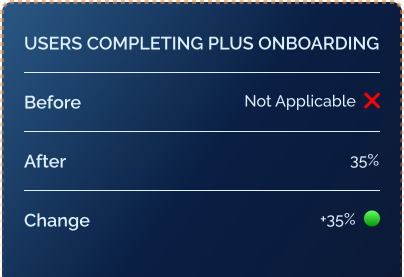
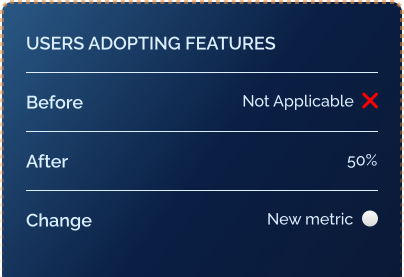
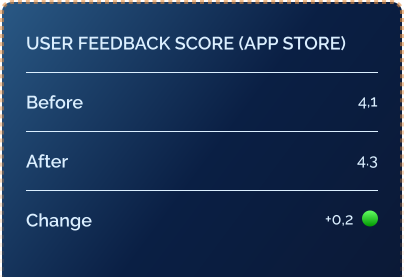
After implementing the new onboarding experience, we observed significant improvements in key user engagement metrics. Beyond metrics, the project established a scalable structure that aligned product and premium onboarding within a single, cohesive experience.
Metric
Before Onboarding
After Onboarding
Change
Users completing App Onboarding
❌ Not applicable
45%
+45%
Churn rate (first week)
34%
30%
-4 PP (-12%)
Users completing Plus Onboarding
❌ Not applicable
35%
+35%
Users adopting features
❌ Not applicable
50%
New engagement
metric
metric
User feedback score
4.1/5
4.3/5
+0.2
Reflection
This project showed that onboarding is not a single flow, but a system shaped by timing, context, and user state.
The key challenge was not designing better screens, but coordinating multiple product goals within one experience.
By focusing on sequencing rather than adding more information, onboarding became more effective in guiding users without overwhelming them.
The key challenge was not designing better screens, but coordinating multiple product goals within one experience.
By focusing on sequencing rather than adding more information, onboarding became more effective in guiding users without overwhelming them.
Let’s talk!
If you’re exploring collaboration or want to understand how I work, reach out directly.
Drop me a lineor reach out to me on LinkedIn.