
.png)
Skalierbare Onboarding-Strategie gestalten
Balance zwischen Produkt-Onboarding und Premium-Konversion

Click on the flag for the English version!
My role
Benchmarking
Research
Facilitator
UX Concept
Prototyping
Research
Facilitator
UX Concept
Prototyping
The team
Product Owner
Premium Team
Editorial Team
UX Team Lead
UI Designer
UX Researcher
App Developers
Premium Team
Editorial Team
UX Team Lead
UI Designer
UX Researcher
App Developers
Deliverables
Stakeholder interviews
Brainstorming Workshop
App Onboarding
Plus Onboarding
Mid Fidelity Prototype
Brainstorming Workshop
App Onboarding
Plus Onboarding
Mid Fidelity Prototype
Kontext
Ziel dieses Projekts war es, das Engagement von Erstnutzern durch ein strukturiertes Onboarding im WELT News App zu verbessern. Parallel dazu gab es eine Initiative für ein eigenes Onboarding für neue WELTplus-Abonnenten, mit Fokus auf die Kommunikation des Premium-Mehrwerts.
Dadurch entstanden zwei Onboarding-Systeme, die parallel entwickelt wurden. Beide richteten sich an Nutzer am Beginn ihrer Journey, hatten jedoch unterschiedliche Ziele und Auslöser.
Um früh eine klare Richtung zu definieren, haben wir zentrale Prinzipien festgelegt, die das Onboarding erfüllen sollte.
Dadurch entstanden zwei Onboarding-Systeme, die parallel entwickelt wurden. Beide richteten sich an Nutzer am Beginn ihrer Journey, hatten jedoch unterschiedliche Ziele und Auslöser.
Um früh eine klare Richtung zu definieren, haben wir zentrale Prinzipien festgelegt, die das Onboarding erfüllen sollte.
Providing an effective mobile application onboarding can significantly impact customer retention and churn rate reduction. According to a 2022 study, despite having an average of 40 apps installed, users spend around 89% of their screen time with a mere 18 applications. Securing a spot within these preferred 18 apps, as opposed to being overshadowed by competitors, depends highly on the user's very first encounter with your app.

Onboarding Design Prinzipien
Als UX Designer arbeitete ich eng mit Product Ownern, dem Plus-Team, einer UX Researcherin, Redakteuren und Entwicklern in einem iterativen, cross-funktionalen Setup zusammen.
Die Herausforderung: Zwei Onboardings in Einklang bringen
Das Design einzelner Screens war nicht die eigentliche Herausforderung. Die Schwierigkeit lag darin, zwei konkurrierende Onboarding-Flows innerhalb einer einzigen User Journey zu vereinen.
- App-Onboarding vermittelt die Kernfunktionen
- Plus-Onboarding kommuniziert Premium-Vorteile
- Der Zeitpunkt der Subscription ist unvorhersehbar
- Nutzer können beide Flows zu unterschiedlichen Zeitpunkten erleben
Ohne Abstimmung entstand ein hohes Risiko für:
- überlappende Trigger
- wiederholte Unterbrechungen
- fragmentierte erste Nutzungserfahrungen
Die Komplexität lag nicht in den einzelnen Flows, sondern in ihrem Zusammenspiel.
Kollaborative Problemdefinition
Um die unterschiedlichen Perspektiven aus Produkt, Redaktion und Entwicklung zusammenzubringen, habe ich einen kollaborativen Workshop moderiert.
Statt einzelne Features zu diskutieren, verlagerte sich der Fokus auf das Gesamterlebnis:Wie kann Onboarding sowohl das Produkt verständlich machen als auch den Premium-Mehrwert kommunizieren – innerhalb einer einzigen Journey?
Statt einzelne Features zu diskutieren, verlagerte sich der Fokus auf das Gesamterlebnis:Wie kann Onboarding sowohl das Produkt verständlich machen als auch den Premium-Mehrwert kommunizieren – innerhalb einer einzigen Journey?

Basierend auf Stakeholder-Input, vorheriger Research und Benchmarking entstand eine gemeinsame Problemdefinition:
“Wie können wir Kernfunktionen und Premium-Mehrwert vermitteln, ohne Nutzer beim ersten Einstieg zu überfordern?“
Designansatz
Nutzer erleben Onboarding nicht als getrennte Systeme, sondern als einen zusammenhängenden Flow. Frühe Konzepte kombinierten beide Onboarding-Ebenen in einer Sequenz – mit dichten und fragmentierten Ergebnissen.


Das führte zu mehreren Problemen:
- überlappende Onboarding-Trigger
- wiederholte Unterbrechungen
- zu viele aufeinanderfolgende Informationsscreens
- unklare Trennung zwischen Produkt- und Premium-Inhalten
Instead of guiding users, the experience risked overwhelming them during first use. Through iteration and quick feedback, the focus shifted toward pacing, reducing density and distributing onboarding more deliberately across the journey.
Zentrale Produktentscheidung
Um die Komplexität aus verschiedenen Einstiegspunkten und Triggern zu beherrschen, habe ich die Onboarding-Logik über Nutzerzustände, Content-Typen und Interaktionsmomente hinweg strukturiert.
Diese Struktur definierte wann Onboarding erscheinen sollte, verhinderte aufeinanderfolgende Informationsscreens und trennte klar zwischen Produkt- und Premium-Onboarding.
Dadurch verschob sich der Fokus von Was zeigen wir?“ → „Wann zeigen wir es?“
Diese Struktur definierte wann Onboarding erscheinen sollte, verhinderte aufeinanderfolgende Informationsscreens und trennte klar zwischen Produkt- und Premium-Onboarding.
Dadurch verschob sich der Fokus von Was zeigen wir?“ → „Wann zeigen wir es?“

Onboarding Triggerpoints Blueprint
Auf dieser Grundlage wurde das Onboarding als sequenzielle Erfahrung neu aufgebaut:
- App-Onboarding vermittelt zunächst das Grundverständnis
- Plus-Onboarding erfolgt verzögert und kontextabhängig
- Onboarding-Elemente werden über die Journey verteilt


So wurde sichergestellt, dass Nutzer zuerst das Produkt verstehen, bevor sie mit Premium-Inhalten konfrontiert werden – bei gleichzeitig weniger Unterbrechungen und mehr Klarheit.
3. Exploring Onboarding Best Practices
Throughout the project, I observed a certain fluidity in the terminology when discussing onboardings and recognized instances of using specific terms interchangeably. This made me to undertake a comprehensive exploration of the realm of "first-screens”, that involved a thorough understanding of distinctions between launch screens, splash screens, and the rest. To bring everyone working on the project aligned, I gave a presentation that showcased an array of initial mobile app interactions designed to welcome, inform, or guide users effectively. By synchronising our terminology and by having a shared understanding, we could ensure a united approach moving forward.

Launch & Splash screens
When to use them?

Personalised set ups
When to use them?

Tooltips & Coach marks (Progressive Onboarding)
When to use them?

Login screens
When to use them?

Walkthrough (Function-oriented onboarding)
When to use them?

Walkthrough (Benefit-oriented onboarding)
When to use them?
6. Refining the User Flow to Prevent Overload
After the stakeholder check-in, I came up with a more unified concept, where the App onboarding screens were prioritised while the Plus onboarding, that became a walkthrough, is only shown to the user after they "completed" the App onboarding.


This userflow was more refined, but somehow it still felt overwhelming. Given the numerous possibilities of how readers interact with our app, with this concept implemented they would encounter a new piece of information on almost every screen, potentially ruining the first experience due to information overload. A quick guerrilla research reassured me in my assumption and I decided to adjust the flow in a way that users always encountered an intermittent screen between two onboarding tooltips, with no new piece of information. The blueprint below proved to be a helpful aid for me to oversee this extensive userflow.
Relying on this blueprint, I created the complete onboarding concept, showcasing both the feature-related onboarding and the plus subscription benefits in a well-timed manner.
Please note: The user flow below shows a case when a new reader interacts with the app the first time and signs up for WELTplus only after having spent a certain amount of time with browsing and reading articles.
Testing: Nutzerfeedback & Erkenntnisse
Nach Abstimmung mit den Stakeholdern wurde das Konzept als klickbarer Prototyp mit fünf Nutzern getestet, um Reibungspunkte und Verständnisprobleme zu identifizieren.

Wichtigste Erkentnisse:
- Nutzer verstanden den Unterschied zwischen Feature-Onboarding und Premium-Kommunikation
- Die neue Sequenz reduzierte wahrgenommene Unterbrechungen
- Es gab keine größeren Verständnisschwierigkeiten über verschiedene Einstiegsszenarien hinweg
- Einzelne Nutzer wünschten sich mehr Personalisierung (für spätere Iterationen berücksichtigt)
Ergebnisse & Impact
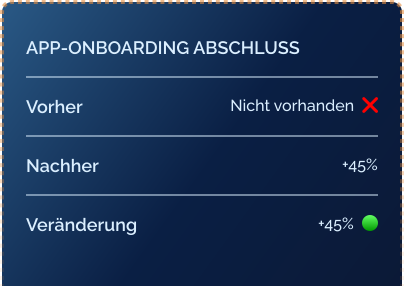
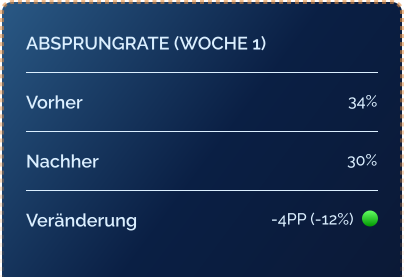
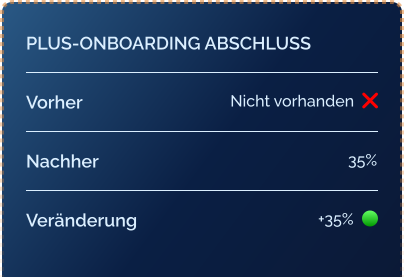
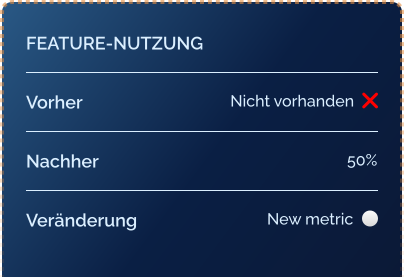
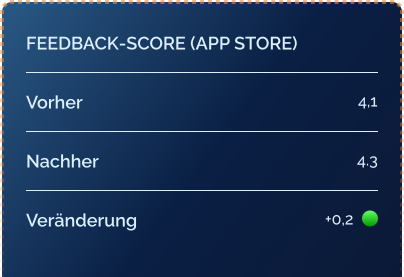
Nach der Implementierung konnten deutliche Verbesserungen in zentralen Engagement-Metriken beobachtet werden. Darüber hinaus entstand eine skalierbare Struktur, die Produkt- und Premium-Onboarding in einer konsistenten Experience vereint.
Metrik
Vorher
Nachher
Veränderung
Abschluss App-Onboarding
❌
Nicht vorhanden
Nicht vorhanden
45%
+45%
Churn Rate (1. Woche)
34%
30%
-4 PP (-12%)
Abschluss Plus-Onboarding
❌
Nicht vorhanden
Nicht vorhanden
35%
+35%
Feature-Nutzung
❌
Nicht vorhanden
Nicht vorhanden
50%
Neuer KPI
Nutzerfeedback
4.1/5
4.3/5
+0.2
Reflexion
Dieses Projekt hat gezeigt, dass Onboarding kein einzelner Flow ist, sondern ein System – geprägt durch Timing, Kontext und Nutzerzustand. Die eigentliche Herausforderung lag nicht im Design einzelner Screens, sondern in der Abstimmung mehrerer Produktziele innerhalb einer Experience.
Durch den Fokus auf Sequenzierung statt Informationsmenge wurde das Onboarding effektiver, und konnte Nutzer besser führen, ohne sie zu überfordern.
Durch den Fokus auf Sequenzierung statt Informationsmenge wurde das Onboarding effektiver, und konnte Nutzer besser führen, ohne sie zu überfordern.
Lass uns reden!
Wenn du an einer Zusammenarbeit interessiert bist oder verstehen möchtest, wie ich arbeite, melde dich einfach direkt bei mir.
Schreib mir eine Nachrichtoder erreiche mich auf LinkedIn.